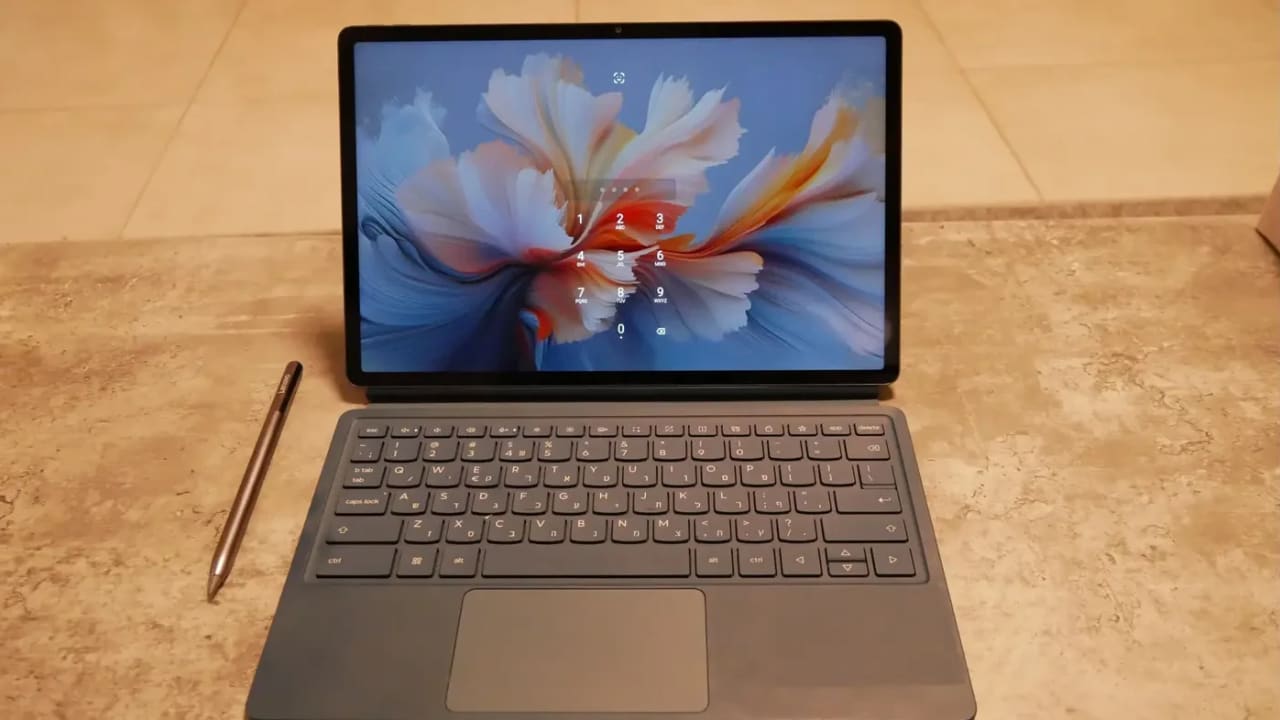
Although the popularity of tablets has declined somewhat, there are still companies betting on them, like Apple with the iPad, and so is Lenovo, which has recently been releasing tablets at a dizzying pace, most of them Android-based. The fundamental problem with Android has always been that it was not perceived as a work operating system. True, there are islands here and there like Samsung’s DEX, but for the most part, multitasking and using an Android tablet was somewhat cumbersome. Now Lenovo with the YOGA Tab Plus is here to change that, with the help of artificial intelligence. Did it succeed? We checked.
Design and Build
Lenovo has cracked the structure of the Surface at least as well as Microsoft, if not better. They have various levels of tablets but this one screams premium. The review unit arrived in blue, with a keyboard cover coated in high-quality blue leather-like material, the keys are relatively comfortable and deep with a satisfying click when pressed, and there’s also a perfectly reasonable-sized touchpad, and a decent front camera for video calls. A magnetic folding cover that doubles as a stand attaches to the clean back, and at the top of the back there’s a bar à la Pixel series in glossy blue with the series name, and no less than two 13-megapixel cameras alongside a flash.
At the top of the tablet there’s a docking point for the pen that also serves to charge it via magnetic induction. Cool. Also on the top are the volume buttons, and on the left side the power button which also includes a fingerprint reader. On the right side there’s a USB-C charging port which is also the only port on the device, and this is the only disappointing point in the design. Headphones will have to be connected via Bluetooth, but there are speaker grilles hiding no less than four speakers tuned by Harman Kardon.

Display and Sound
The screen is super impressive. It’s a 4K screen with deep colors (the red is a bit too saturated for my taste, even in low saturation mode), insane brightness (most of the time you can work with it on low brightness without even noticing, its high brightness is really blinding indoors), and the detail and sharpness are excellent. This screen is really enjoyable both as a tablet and as a work computer. The speakers deliver rich sound thanks to Dolby Atmos, with good separation, and a surprisingly large soundstage, so watching movies is definitely possible and enjoyable, and Lenovo even included an entertainment app (see later) that takes advantage of these features.
In addition, the fact that there are dual 13-megapixel cameras on the back makes the YOGA Tab Plus also a suitable device for photography and creativity, for those who want to use a tablet as a creative tool, and also for other needs, see the next section.
Performance and User Experience
Lenovo did something interesting with the YOGA Tab Plus – they added a local artificial intelligence tool for document search. The idea is that over time, the tool builds you a database of all the documents on the computer, making searching through them more sophisticated and efficient. This tool takes longer to build than the time I had this computer for review, so I couldn’t test it in depth, but it’s an interesting tool.
And regarding concerns about Android as an operating system suitable for work, they were completely dispelled. This is the first tablet I tested that provides support for real multitasking and real work. A better productivity experience than before. I’m not sure who deserves the credit, but unlike the past when Android tablets provided a terrible productivity experience, this time they solved it: The ability to place floating or side-by-side windows, true multitasking, and even a full desktop mode (called here PC mode) with Windows-style windows, make this tablet a real work tool.

The pen, by the way, has excellent capabilities of its own and Lenovo put in many uses – from presentation remote control, to scribbling notes, taking screenshots, and more, all with the help of a floating menu. Great.
Lenovo also added a successful entertainment hub here, including Hebrew and connection to all your subscriptions, so if you want to use the tablet as a device for watching movies and series, this addition is very useful. And finally, the unusual cameras for a tablet – good not only for photography: They are very high quality, and allow zooming and magnification, convenient scanning of documents, or even taking pictures with the tablet, which is not usually common.
In terms of performance, this is a high-end model and it received the current “Rolls Royce” of processors: Snapdragon 8 Gen 3, with 16GB of memory, and the performance is indeed very good: In the Wild Life Extreme test, the YOGA Tab Plus scored 4185, beating 84 percent of the tested machines, in the Solar Bay test which also checks advanced graphics capabilities such as ray tracing, it scored 7785 points and beat about three-quarters of the tested machines, and finally, in the more recent Steel Nomad test, it scored 1589 points with a decent mid-range placement: Better than 54 percent of all devices tested in the benchmark. Very respectable performance, especially for a work tablet. This means it can also handle heavier tasks, like gaming and video editing.
Battery Life and Bottom Line
The YOGA Tab Plus battery forecast talks about a workweek for the 10,200mAh battery. This is somewhat exaggerated, but we managed to squeeze out a whole day of video playback (about eight hours) at full screen brightness which is impressive in itself. With average screen brightness and mixed use, it will easily last you a day and a half or two working days without searching for an outlet.
The price of the YOGA Tab Plus is not cheap, and it is sold for about NIS 3250 in various chains. This is the price of an average laptop. If you’re in love but with a tablet as your convenient work format, including scribbling directly on the screen (and Lenovo really provides a very comprehensive kit, which also includes a high-quality keyboard cover and a turbo stylus pen with magnetic charging and various uses). The YOGA Tab Plus is a worthwhile investment and a possible replacement for a clamshell-type laptop, especially if you already work mainly with Android and Google tools, but also with Microsoft. The YOGA Tab Plus finally makes working on Android enjoyable, without the dilemma: Laptop or tablet?